---
title: "How to Rank on Google: Complete SEO Checklist"
description: Get your SEO checklist to optimize your site, covering Google tools, keyword research, technical SEO, on-page content, and off-page strategies to rank higher on Google.
image: https://pixllabs.io/hubfs/assets/images/blog/covers/seo-checklist.jpg
---
- Solutions
###### HubSpot CMS Solutions
Customize your HubSpot website experience with our expert development services.
- [ Custom Themes Designed for scalability and easy content management](https://pixllabs.io/hubspot/custom-themes)
- [ HubDB Manage your content like resource libraries, product listings, and events](https://pixllabs.io/hubspot/hubdb)
- [ Landing Pages Custom landing pages made for your specific marketing needs](https://pixllabs.io/hubspot/landing-pages)
- [ Blog Templates Increase your blog's engagement and drive lead generation](https://pixllabs.io/hubspot/blog-templates)
- [ Modules Empower your marketing team with easy-to-customize HubSpot modules](https://pixllabs.io/hubspot/modules)
- [ Dynamic Pages Content at scale with the push of a button](https://pixllabs.io/hubspot/dynamic-pages)
Latest Projects
[ First Stop Health First Stop Health provides care that people love with 24/7 access to licensed doctors via app, web or phone](https://pixllabs.io/portfolio) [ Agilence Agilence is the undisputed leader in data analytics and reporting for retail, grocery and convenience stores.](https://pixllabs.io/case-study/agilence)
[Web Design Need a new look for your website?](https://pixllabs.io/hubspot/web-design)
- [Our Work](https://pixllabs.io/portfolio)
- [Blog](https://pixllabs.io/blog)
[Book a discovery call](https://pixllabs.io/contact)
- Solutions
###### HubSpot CMS Solutions
Customize your HubSpot website experience with our expert development services.
- [ Custom Themes Designed for scalability and easy content management](https://pixllabs.io/hubspot/custom-themes)
- [ HubDB Manage your content like resource libraries, product listings, and events](https://pixllabs.io/hubspot/hubdb)
- [ Landing Pages Custom landing pages made for your specific marketing needs](https://pixllabs.io/hubspot/landing-pages)
- [ Blog Templates Increase your blog's engagement and drive lead generation](https://pixllabs.io/hubspot/blog-templates)
- [ Modules Empower your marketing team with easy-to-customize HubSpot modules](https://pixllabs.io/hubspot/modules)
- [ Dynamic Pages Content at scale with the push of a button](https://pixllabs.io/hubspot/dynamic-pages)
[Web Design Need a new look for your website?](https://pixllabs.io/hubspot/web-design)
- [Our Work](https://pixllabs.io/portfolio)
- [Blog](https://pixllabs.io/blog)
[Book a discovery call](https://pixllabs.io/contact)
[Blog](https://pixllabs.io/blog) / [SEO](https://pixllabs.io/blog/tag/seo)
21 min read
# How to Rank on Google: Complete SEO Checklist

Author
Joshua Todd
Published
December 11, 2022
Last Update
March 31, 2025
Share
You are going to want your SEO to be the best that it has ever been.
With a latest [Google Algorithm updates in 2025](https://www.searchenginejournal.com/google-algorithm-history/?ver=2025) rolling out, many websites saw a decrease in organic traffic.
Knowing the latest SEO trends and what most SEO experts are currently doing will help put your site in the best position for success.
**In this article, we will provide you with a step-by-step guide to optimizing your website using an effective SEO checklist.**
## Basics Of SEO
If your site is brand new or you just want to make sure you have your SEO basics covered, this quick list will make sure you have your foundation laid out.
### 1. Setting Up Google Search Console
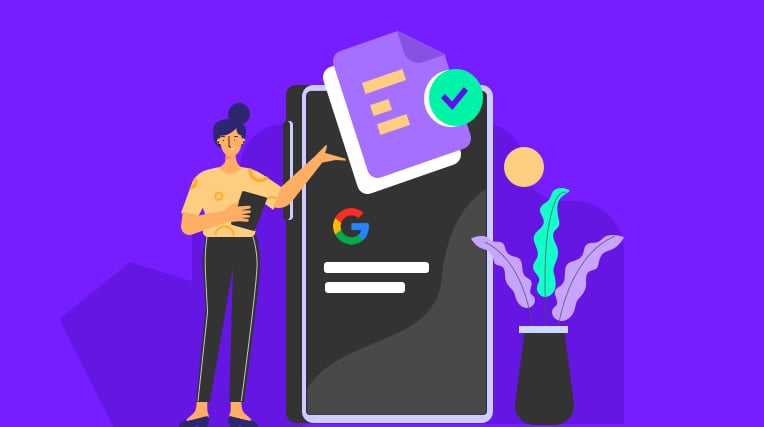
One of the first things you will want to do is set up [Google Search Console](https://search.google.com/search-console/about).
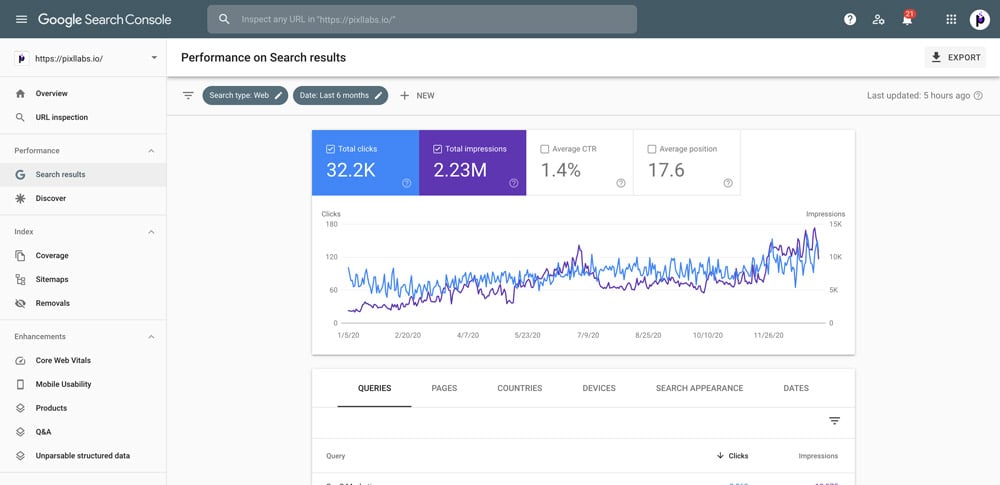
Search Console will give you just about all of the reporting you need to improve the on-site SEO improvements of your site. Setting up GSC is very easy and as time goes on, you will find yourself using this tool very often.
- See what pages and what keywords your website ranks for in Google
- Reports on impressions, clicks, click rate and ranking position
- Errors and warnings causing difficulties for Google indexing your pages properly
### 2. Setting Up Google Analytics
[Google Analytics](https://www.google.com/analytics/) is another must-have to optimize the SEO of your site.
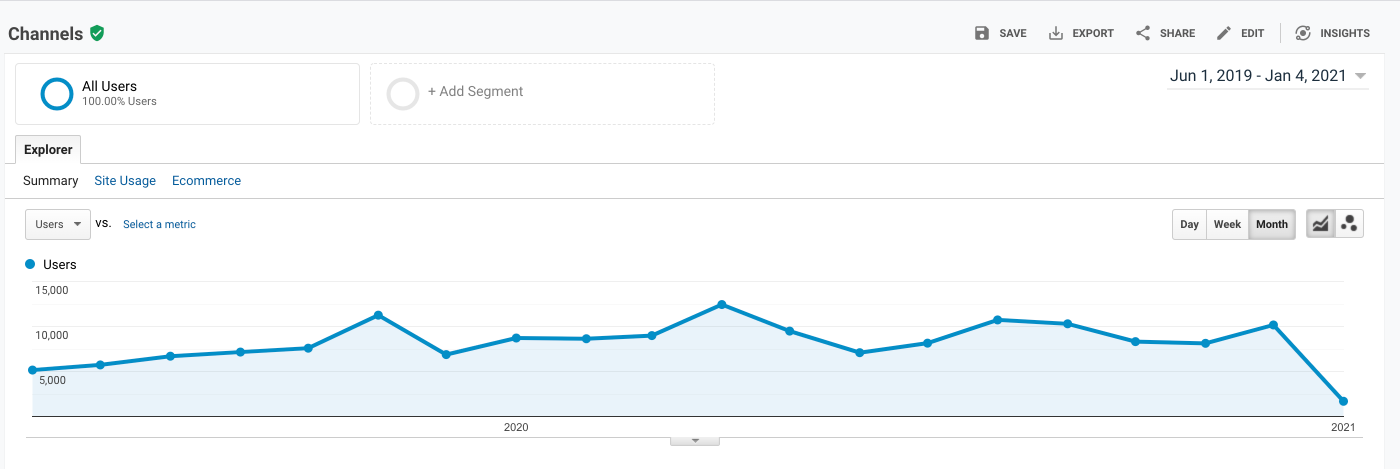
Analytics gives you all of the data of your site and how users interacted with your content.
You can use this data to **optimize for better conversion rate, bounce rate, sessions, and much more**.
### 3. Setup SEO Plugin (*If Applicable*)
If you are using a plug and play website such as WordPress or Wix, you will need to look at using an SEO plugin such as [Yoast SEO](https://yoast.com/wordpress/plugins/seo/).
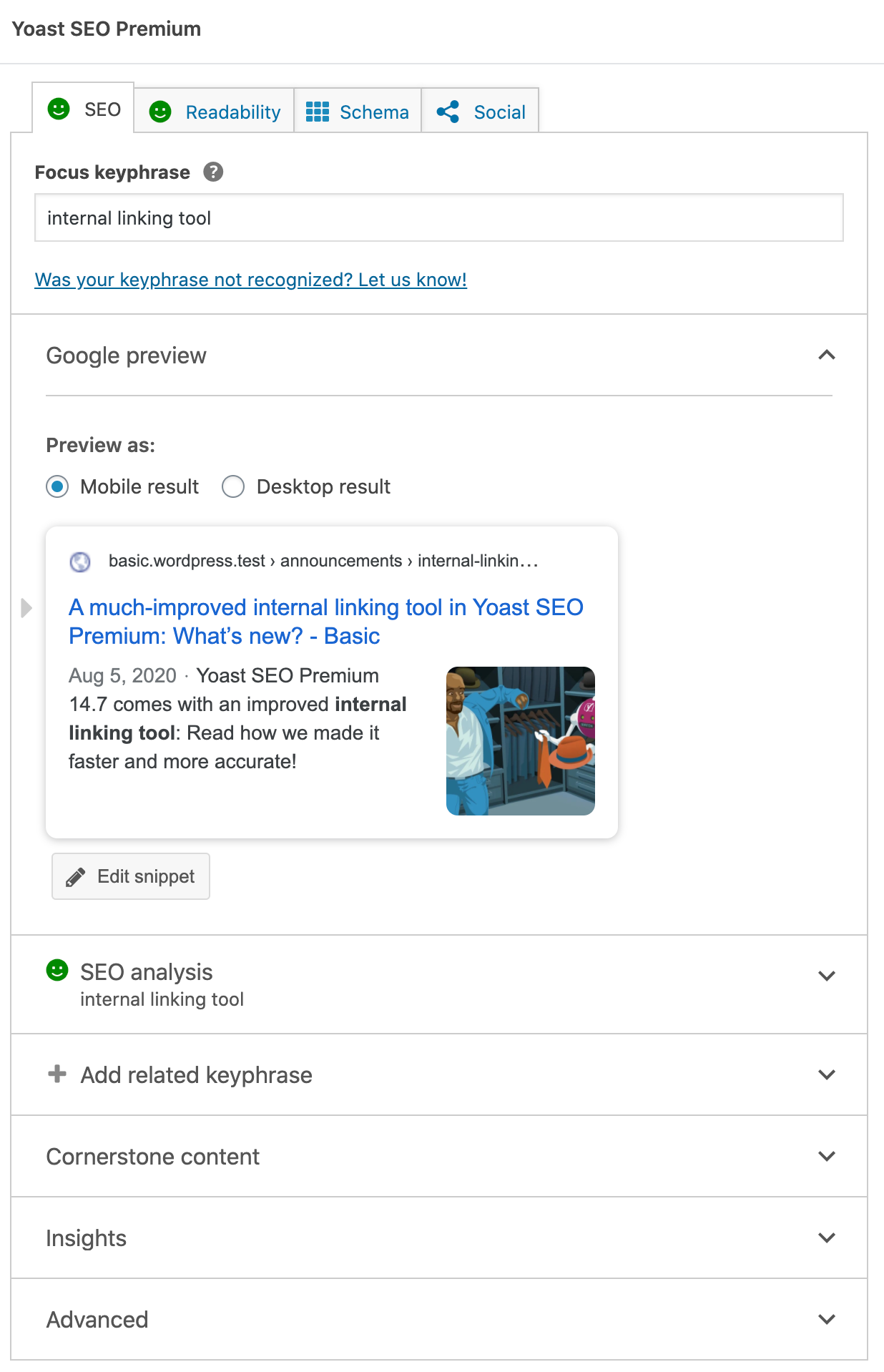
Yoast SEO - Wordpress Plugin
An SEO plugin will allow you to easily modify your site for the best SEO practices. Think of this as a cheat-sheet template for optimizing your site for search engines.
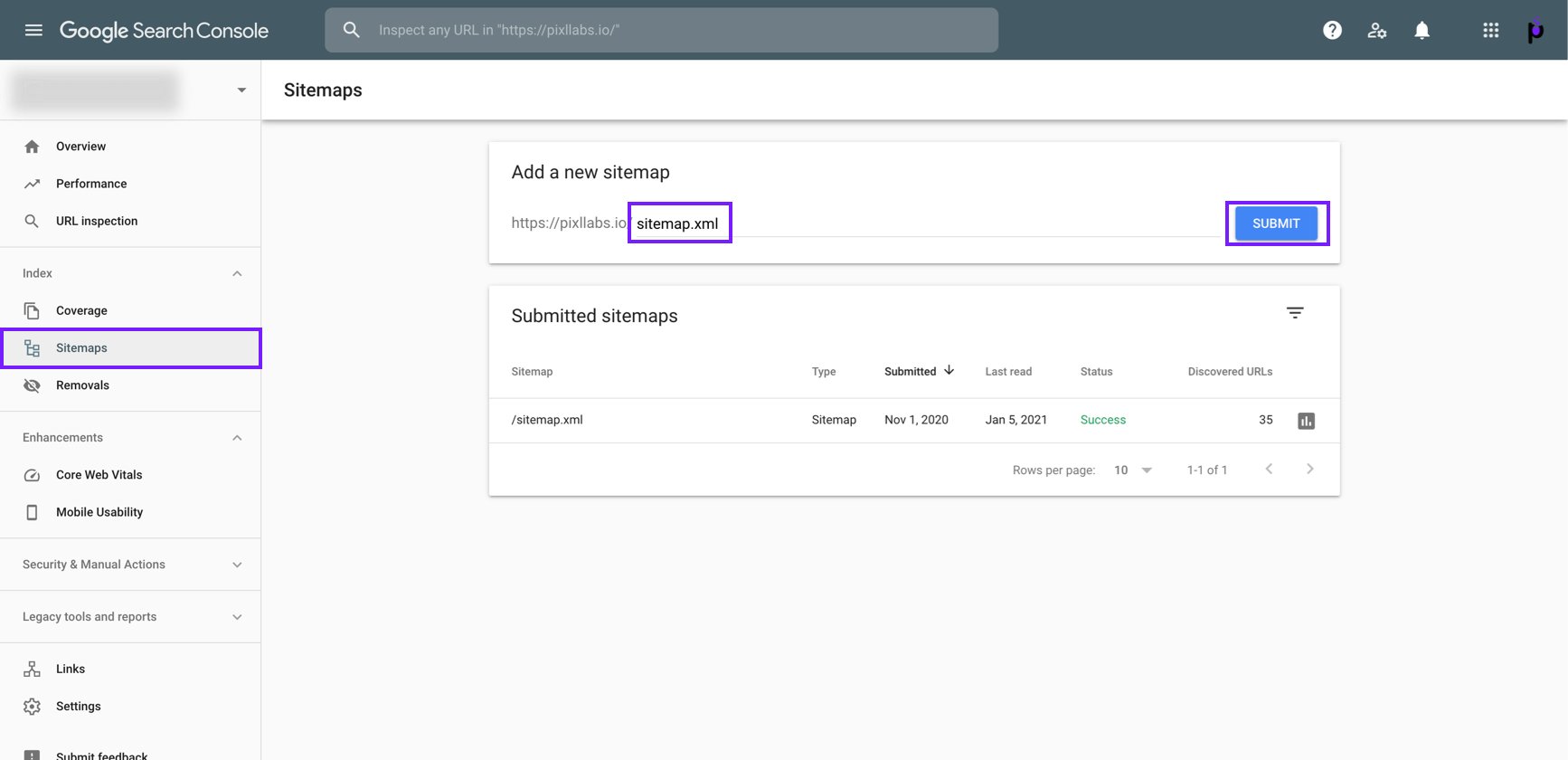
### 4. Generate/Submit Sitemap
A sitemap is what Google looks at to navigate your site.
It will show your site structure in text form to allow Google’s crawl bots to easily crawl your site. With a sitemap, you can have your site indexed quickly and organized in a way that Google favors.
### 5. Make Sure Your Site Is Being Indexed
Lastly, you will want to make sure your site is being indexed by Google. Indexed means that Google is serving your site on their search results.
You can check this through **Google Search Console** or by **typing in “site:(Insert URL)” into your search bar**.
## Keyword Research
Keyword research is the foundation of any successful SEO strategy. It involves identifying the relevant keywords and phrases that your target audience is likely to use when searching for products or services similar to yours.
Utilize keyword research tools like Google Keyword Planner, SEMrush, or Ahrefs to discover high-value keywords with a decent search volume and low competition. I'll list a few free and paid options below.
Wordtracker has a [free keyword search tool](https://www.wordtracker.com/).
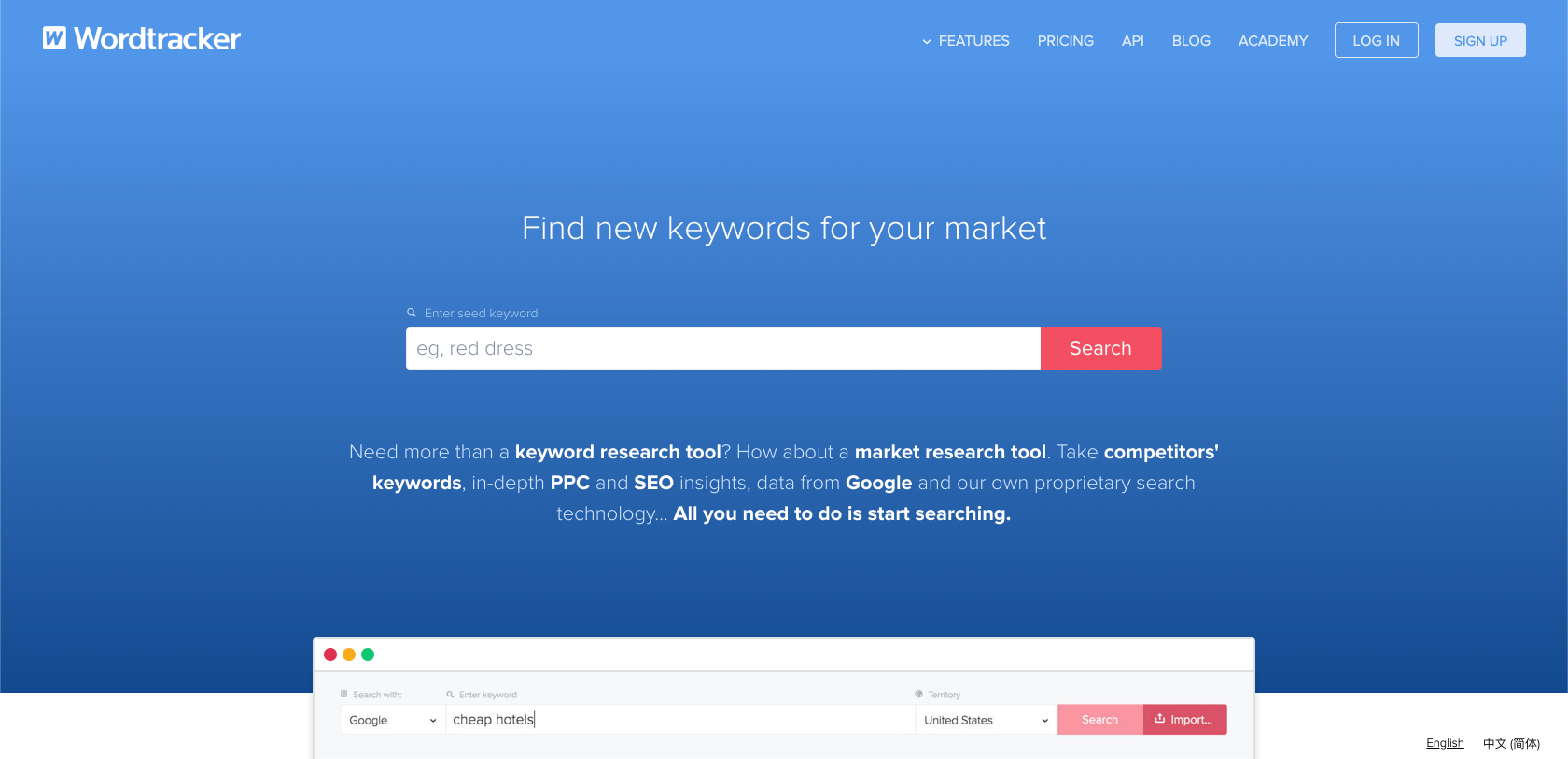
If you are looking for a **premium keyword tool** try [SEMrush](https://www.semrush.com/) or [Ahrefs](https://ahrefs.com/).
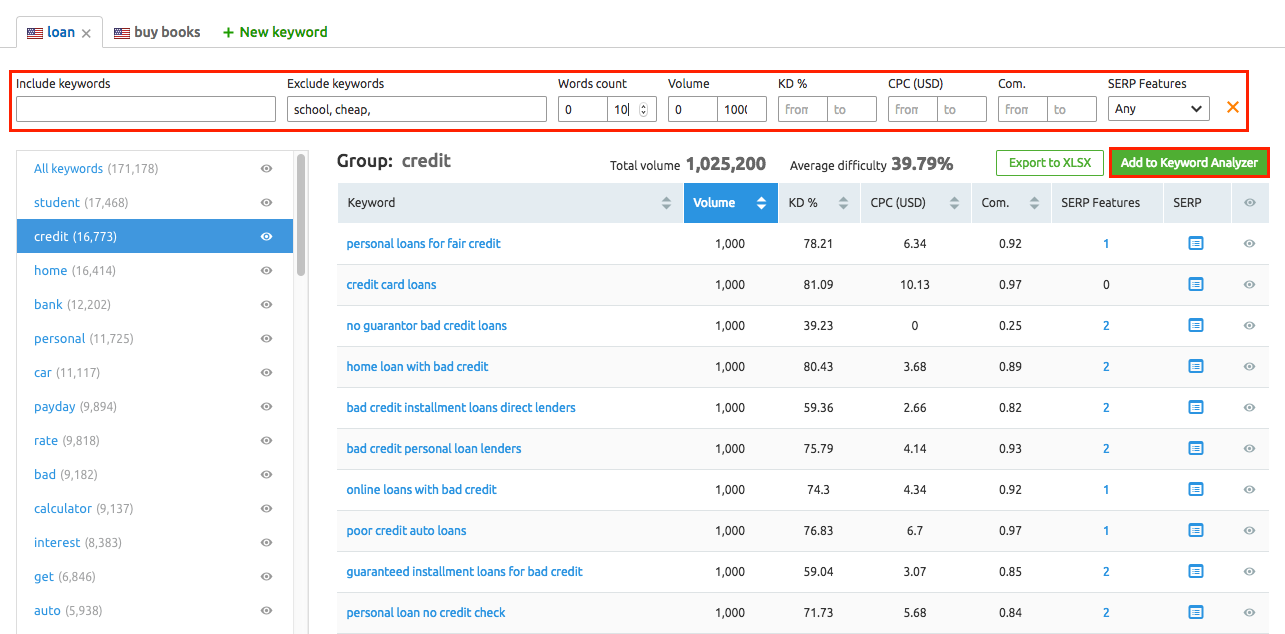
SEMrush Keyword Research Tool
Once you’ve found a keyword tool you like, start implementing these strategies.
### 1. Who Are Your Competitors?
Take some time to identify your competitors. This will give you plenty of data on what is working for them, what kind of content they are producing, what your competitive landscape will look like in Google, and what customers like/dislike.
### 2. Run A Keyword Gap Analysis
A keyword gap analysis is a great report to run to see where you stand against your competitors.
A keyword gap analysis will show you keywords that your competitor currently ranks for that you do not rank for.
### 3. Establish Main Keywords
The most important part of keyword research is finding and establishing the main keywords.
These are going to be the keywords that you will want to rank for, so you will want to create content around these specific keywords. Depending on how broad your keywords are, will decide how difficult they are to rank.
### 4. Establish Long-Tail Keywords
Long-tail keywords are grouped keywords that relate to your main keywords.
When creating a list of long-tail keywords, start by identifying your main keywords and then brainstorm related keywords that provide more context or specificity.
For example, if your main keyword is "men's shirts," you can create long-tail keywords like "*black men's shirts*" or "*men's shirts under $20*".
Additionally, consider incorporating question keywords that address the research phase of the customer journey, such as "where to buy men's shirts" or "how are men's shirts measured."
Prioritize your keywords based on search volume and difficulty to determine the ones with the highest potential impact.
By utilizing long-tail and question keywords effectively, you can optimize your website for specific search queries and improve your chances of ranking higher in search engine results.
### 5. Prioritize Keywords By Search Volume/Difficulty
Once you have all of your keywords, it is time to find the search volume and difficulty of each.
Using any of the basic SEO tools, such as [SEMRush](https://www.semrush.com/), find the search volume and difficulty of each keyword and put them in order from highest to lowest to set priority for your content.

## Technical SEO
Next on the list is technical SEO. While this may seem like the most difficult part of doing SEO, most of the basic tasks can be done in Google Search Console.
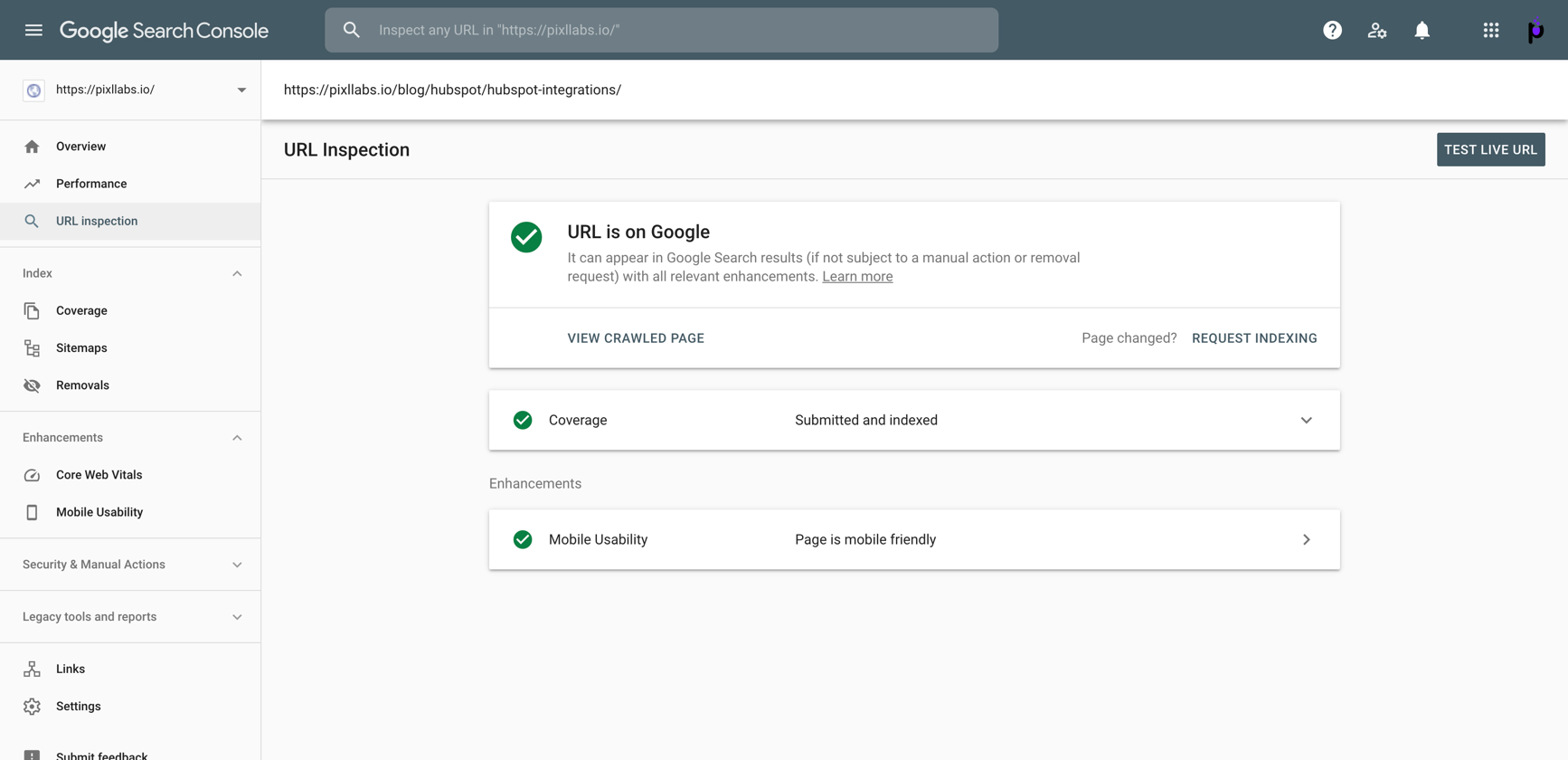
### 1. Use “Inspect URL” In Google Search Console
The “Inspect URL” tool in Google Search Console can give you all types of information regarding the specific page you are looking at.
Pro Tips
Use this tool to check for any errors or improvements you can make to get your page up to par.
### 2. Make Sure Your Site Is Mobile-Friendly
With more and more people using mobile devices, it has never been more important to be mobile-friendly. Google Search Console has tests to run on your site to ensure that it is as mobile-friendly as can be.
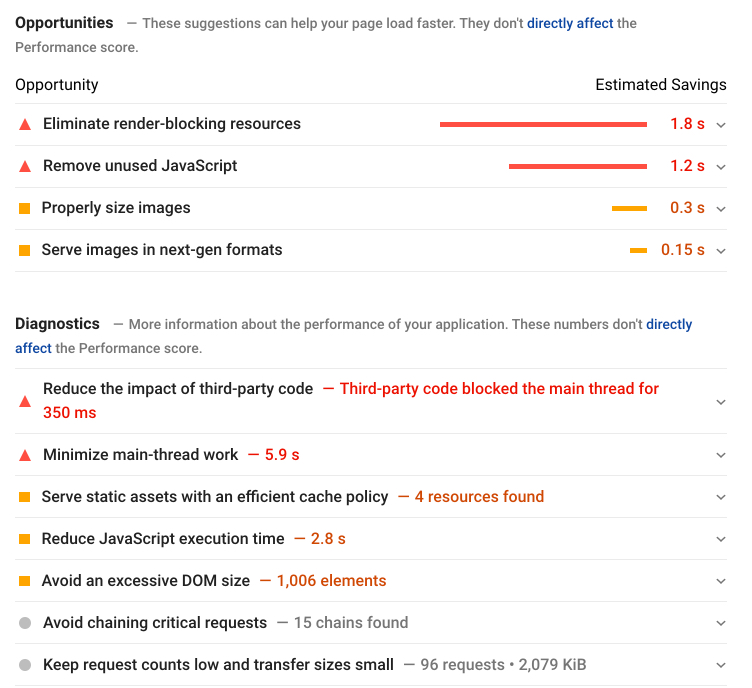
### 3. Check/Improve Site Speed In Search Console
Site speed will have a drastic effect on user experience. If your site is slow and hard to navigate, **Google will penalize you** and this will greatly affect your rankings.
Google Search Console offers a site-speed tool that will give you suggestions on how to improve it.
You can also use [Google’s page speed test](https://developers.google.com/speed/pagespeed/insights/), it will give you suggestions on how to go about fixing your page speed.
### 4. Ensure You Are Using HTTPS
If you notice that your site is still on HTTP, it is time to upgrade to HTTPS. HTTPS denotes a secure site and Google shows precedence for sites that are on HTTPS.
### 5. Identify & Correct Crawl Errors
Crawl errors are another feature that you can find in Google Search Console. Crawl errors are errors that Google has found while crawling your site.
These are generally easy to fix and Google Search Console gives you great instructions on how to resolve them.
### 6. Check Page Depth
Page Depth is a report in Google Analytics that shows how far a visitor got into your site. Use this report to gauge how well your navigation is and how people are going through your content.
### 7. Identify & Correct Broken Links
Broken links on a site are bad news for SEO. Google sees these as an ill-maintained site. Find broken links with an SEO tool and fix them using new, relevant links. These can be internal or external links.
### 8. Utilize SEO-Friendly URL Structure
URL structure, while it may seem minuscule, actually plays a big role in overall SEO. Following Google’s best practices when it comes to creating URLs will only make your SEO stronger.
### 9. Identify & Correct Orphan Pages
Orphan pages are pages that are not in any categories. Google cannot reach these pages through normal navigation so this reflects poorly on your site’s navigation. Check your orphan pages monthly or quarterly to ensure nothing is out of order.
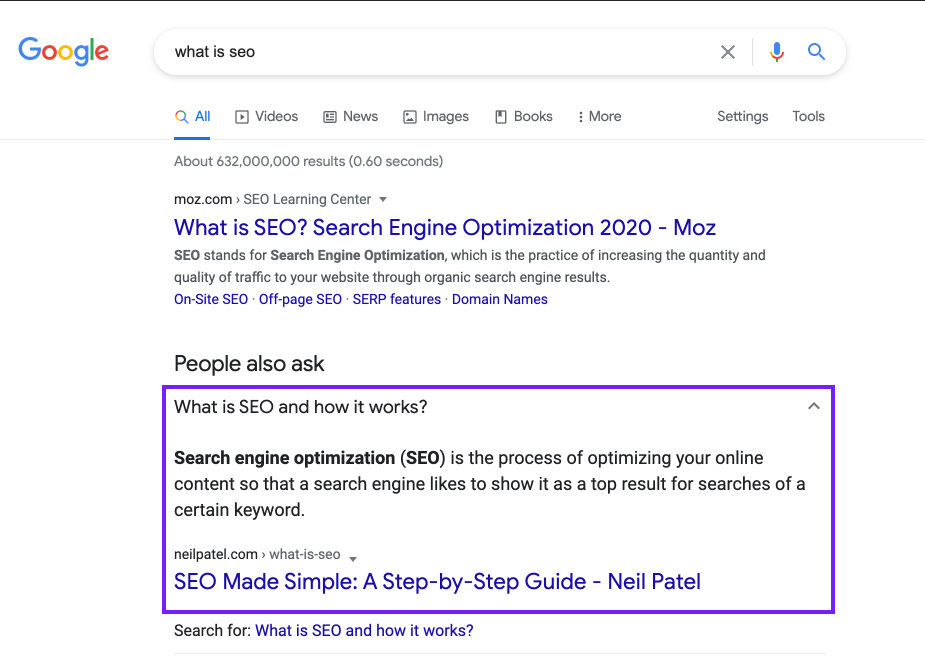
### 10. Add Structured Data
Structured data is code that Google uses to identify the content you are putting on your site. This can be for videos, content, photos, and much more. You can find out more about [structured data](https://developers.google.com/search/docs/guides/intro-structured-data) through Google Search Console.
Adding structured data to your website will give you an oppurtunity for your content to show up as a rich snippet.
## On-Page Content
On-page content is quite possibly the easiest part of SEO. On-page content refers to title tags, meta descriptions, H1s, and other content that is on your site.
By implementing processes for getting this right the first time, you can keep maintenance to a minimum.
### 1. Identify & Correct Duplicate Or Missing Title Tags
Title tags are going to be one of the main parts of your SERP result and content page. Google frowns upon duplicate and missing titles tags so identifying and correcting these is very important.
### 2. Identify & Correct Duplicate Or Missing Meta Descriptions
Much like title tags, meta descriptions should not be skipped or duplicated. Creating unique content for each one of your pages should be one of your number one priorities and will reflect greatly with Google.
### 3. Identify & Correct Multiple H1 Tags
H1 tags are the largest header on your page. You will want to keep this to one per page so that Google can accurately determine what your page’s content is about.
### 4. Continue To Optimize All Of The Above
While you make sure that all of the above is not duplicated or missing, you will want to continue to optimize each of these throughout the life of your site. Optimizations should be based on keyword performance, CTR, impressions, sessions, and other metrics.
### 5. Optimize Images For SEO
Images should not be forgotten as they carry a lot of weight when it comes to SEO. Adding alt tags and captions can really help your page rank higher and your image rank within image sites such as Google Images.
### 6. Update Outdated Content
If your site has older content, it is always a good idea to revisit these pages and update them to more relevant content. With Google changing their algorithm quite often, some of your older content may be stale or optimized for other algorithms.
## Off-Page SEO
Once you have your on-site SEO completed, you can start working on off-page SEO. This is going to be a little more time consuming but can have a great impact on your overall SEO.
### 1. Analyze Link Profiles Of Competitors
Using SEO tools, you can run link profile reports of your competitors. This is a report that shows all of the backlinks that your competitor has so you can identify who you should reach out to for getting backlinks in your industry.
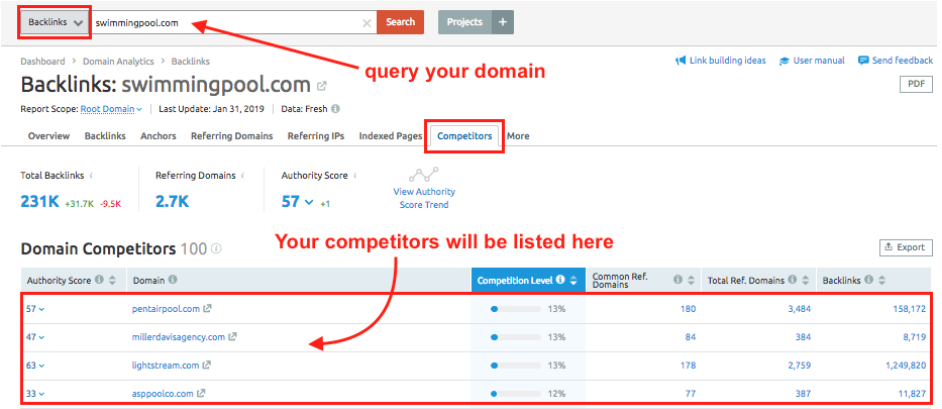
SEMrush Competitor Analysis
### 2. Build High Quality Backlinks
Backlinks, or inbound links from other websites, are an essential component of off-page SEO. They signal to search engines that your website is trustworthy and authoritative. Aim to acquire high-quality backlinks from reputable websites within your industry. This can be achieved through guest blogging, influencer outreach, or creating link-worthy content that naturally attracts backlinks.
### 2. Steal Competitor’s Broken Backlinks
This presents a valuable opportunity for you to provide your own updated and relevant content as a replacement.
By doing so, you can quickly and easily gain backlinks that were previously pointing to your competitor's site. This strategy is not only effective but also relatively simple to implement, making it a great way to boost your website's SEO and improve your search engine rankings.
Check out Ahref's [broken link checker](https://ahrefs.com/broken-link-checker) to find out which links your competitors have that may be broken.
### 3. Implement Skyscraper Technique
The Skyscraper Technique, pioneered by renowned digital marketer Brian Dean of [Backlinko](https://backlinko.com/), is a proven method for creating exceptional content that attracts high-quality backlinks and drives organic traffic.
This involves finding a highly linked article, writing a similar article that is way better, and then reaching out to have your site linked instead as a higher quality replacement.
### 4. Online Directories and Local Listings
Submit your website to relevant online directories and local citation platforms. Ensure that your business information is accurate, consistent, and up-to-date across these platforms.
This improves your website's visibility and helps search engines understand your business's location and relevance.
### 5. Online Reviews and Testimonials
Encourage satisfied customers to leave reviews and testimonials on [prominent review platforms](https://www.semrush.com/blog/review-platforms-seo/) and your website.
Positive reviews not only enhance your brand's reputation but also contribute to local SEO efforts, especially for location-based businesses.
### 6. Turn Unlinked Mentions Into Links
Another very easy way to get backlinks is by finding mentions of your site that are not linked, and simply asking the website owner to link your site. There are several software programs available that will find these mentions for you to help save you some time.
## Conclusion
In conclusion, optimizing your website for SEO is crucial for maintaining and increasing organic traffic.
By following the steps outlined in this article, which cover the basics of SEO, keyword research, technical SEO, on-page content, and off-page SEO, you can ensure that your website is well-positioned for success. Remember to utilize tools such as Google Search Console, Google Analytics, and SEO plugins like Yoast SEO to make the process easier.
By staying up to date with the latest SEO trends and implementing best practices, you can improve your website's visibility, attract more organic traffic, and ultimately achieve your goals.
So, don't wait any longer - start optimizing your website today and watch as your online presence grows.
##### Receive resources directly to your inbox
Sign up to get weekly insights & inspiration in your inbox.
In this article
### You might also like...

###### Step-by-Step SEO for HubSpot Blogs: The 2025 Marketer’s Checklist
Want your HubSpot blog posts to rank higher and drive more traffic? Follow this SEO checklist built for marketers to improve visibility, structure, an...
SEO
###### Landing Page Conversion Rates: What is a Good Conversion Rate and How Do You Track It?
In this article, you’ll see what a good conversion rate is by industry and how you can calculate your conversion rates. Learn how to calculate your l...
Landing Pages

###### What is a Landing Page? The Ultimate Guide to Landing Page Creation
New to landing pages? Check out this comprehensive guide to creating a landing page and build your first page with a crisp look and greater confidence...
Landing Pages
HubSpot CMS solutions that drive results. [Work with us](https://pixllabs.io/contact)
Contact
- [josh@pixllabs.io](mailto:josh@pixllabs.io)
- [tel:](tel:)
Follow us
-
-
-
- HubSpot CMS Solutions
- [Custom Themes](https://pixllabs.io/hubspot/custom-themes)
- [Modules](https://pixllabs.io/hubspot/modules)
- [HubDB](https://pixllabs.io/hubspot/hubdb)
- [Blog Templates](https://pixllabs.io/hubspot/blog-templates)
- [Landing Pages](https://pixllabs.io/hubspot/landing-pages)
- [Dynamic Pages](https://pixllabs.io/hubspot/dynamic-pages)
- Services
- [Web Design](https://pixllabs.io/hubspot/web-design)
- Resources
- [Blog](https://pixllabs.io/blog)
- HubSpot CMS Solutions
- - [Custom Themes](https://pixllabs.io/hubspot/custom-themes)
- [Modules](https://pixllabs.io/hubspot/modules)
- [HubDB](https://pixllabs.io/hubspot/hubdb)
- [Blog Templates](https://pixllabs.io/hubspot/blog-templates)
- [Landing Pages](https://pixllabs.io/hubspot/landing-pages)
- [Dynamic Pages](https://pixllabs.io/hubspot/dynamic-pages)
- Services
- - [Web Design](https://pixllabs.io/hubspot/web-design)
- Resources
- - [Blog](https://pixllabs.io/blog)
© 2026 Pixl Labs, LLC
```json
{
"@context" : "https://schema.org",
"@type" : "Organization",
"contactPoint" : [ {
"@type" : "ContactPoint",
"contactType" : "Customer Support",
"email" : "hello@pixllabs.io",
"telephone" : "908-283-3931"
} ],
"description" : "Craft exceptional HubSpot websites with our specialized design and development services. Supercharge your website, create custom themes, and effortlessly generate dynamic content with HubSpot CMS. Boost your conversions and captivate your audience.",
"knowsAbout" : [ "HubSpot", "HubSpot CMS", "HubSpot Development", "Web Development", "Web Design", "HubDB", "SEO", "SaaS" ],
"logo" : "https://pixllabs.io/hubfs/pl-logo.svg",
"name" : "Pixl Labs",
"sameAs" : [ "https://www.facebook.com/pixllabsagency/", "https://www.linkedin.com/company/pixl-labs/", "https://twitter.com/pixllabsagency", "https://www.pinterest.com/pixllabsagency/" ],
"url" : "https://pixllabs.io"
}
```
```json
{
"@context" : "https://schema.org",
"@type" : "BlogPosting",
"author" : {
"@type" : "Person",
"name" : "Joshua Todd",
"url" : "https://pixllabs.io/blog/author/joshua-todd"
},
"dateModified" : "2025-03-31T16:15:08.303Z",
"datePublished" : "2022-12-11T15:50:04.000Z",
"headline" : "How to Rank on Google: Complete SEO Checklist",
"image" : [ "https://pixllabs.io/hubfs/assets/images/blog/covers/seo-checklist.jpg" ],
"mainEntityOfPage" : {
"@id" : "https://pixllabs.io/blog/seo/seo-checklist/",
"@type" : "WebPage"
},
"publisher" : {
"@type" : "Organization",
"logo" : {
"@type" : "ImageObject",
"url" : "https://pixllabs.io/hubfs/clients-2024/logos/limelight-logo-dark.svg"
},
"name" : "Pixl Labs"
}
}
```